27 marzo 2026

This release brings a new way to browse the marketplace, improvements to inventory management, and continued polish across mobile and desktop. We’ve focused on making it easier to find good deals, manage your collection faster, and keep navigation smooth across the app.
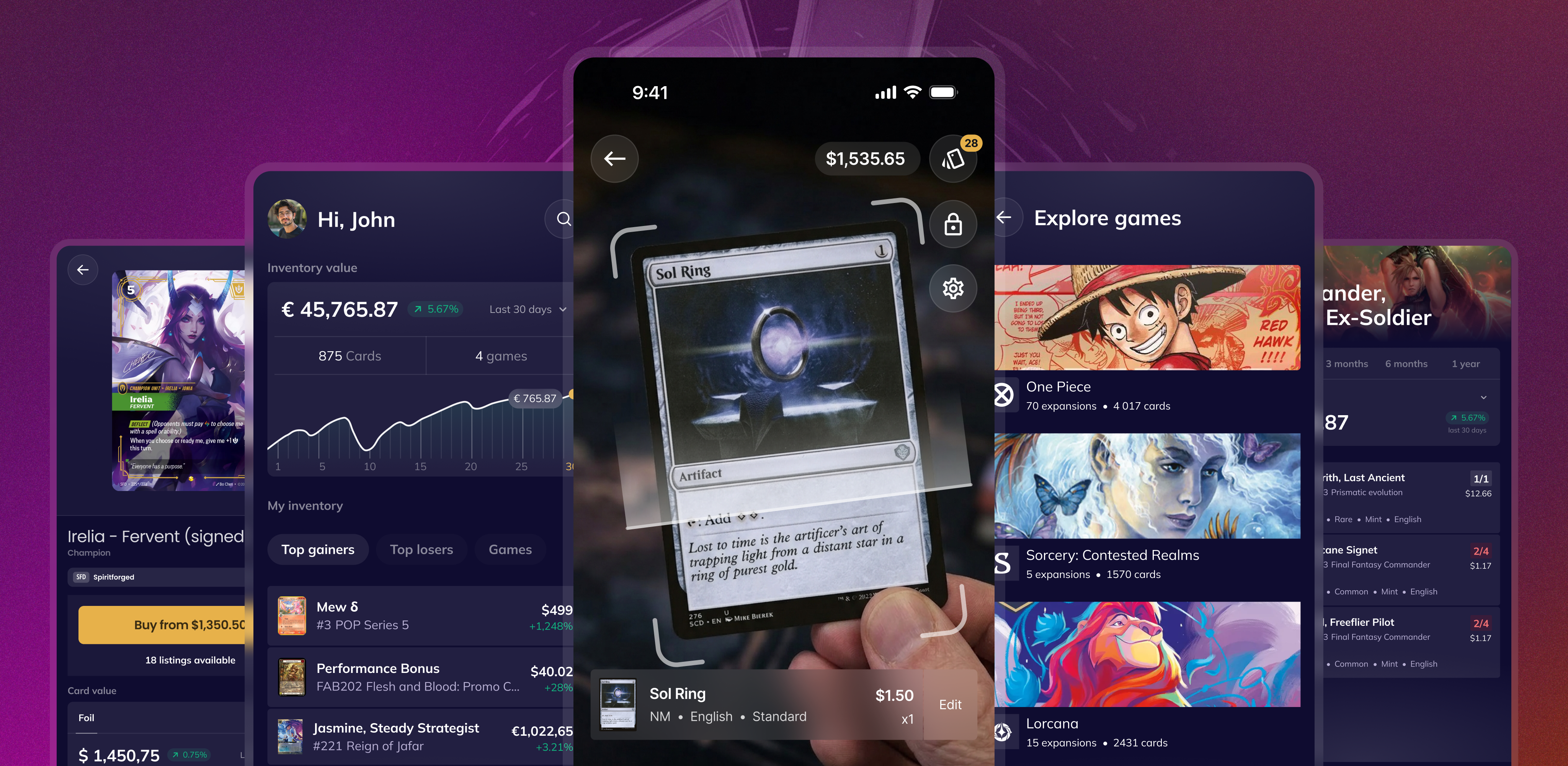
CardNexus mobile is live on the App Store and Google Play
We shipped our native mobile apps for iOS and Android. CardNexus on your phone is built for real collection work:
Your full inventory — browse and manage your collection on the go.
A card scanner we believe is the fastest on the market — tuned to recognize every game we support today, so you can add cards without fighting the camera.
List for sale in a few taps — take something from your bag to a live listing without opening a laptop.
Everything you need for your collection in your pocket, whenever you want it.
👉 We also pushed our first update since launch (0.9.25 on App Store & Play Store):
Streamer mode to avoid UI overlap when recording or streaming
Search field added in expansions
Fixed a bug where scanned cards could send wrong quantities
Scanner improvements to reduce wrong game detection prompts
Plus many small fixes and stability improvements
Hot deals, fresh listings, smarter browsing
On the desktop app, we added Shop Now in the header. It takes you to a new page we call the Feed: a stream of new marketplace listings, so you can see what landed recently and dig in by the games you care about.
Explore also gets a carousel of the latest hot deals — strong offers you can skim before they’re gone. That “hot deals only” view is available on the Feed as well, so you can focus on bargains when you want to shop efficiently.
Less searching, more discovering.
Sort by last modified in inventory
You can now sort your inventory by last modified.
This makes it easy to:
find the last cards you added
quickly fix mistakes
review recent changes
continue a scanning or import session
A small change, but very useful when working with large inventories.
Navigation update — cleaner filters, smoother UI
We’ve reworked the filter, sort, and view components to make navigation smoother across the whole app, with a big focus on mobile usability.
No more UI glitches when switching filters or views
Cleaner header icons and spacing
Table actions improved for small screens
Everything should now feel more stable, faster, and easier to use — especially when moving between pages.
Fixes & improvements
Disputes: clearer rules so edge-case resolutions don’t run ahead of an active seller proposal.
Orders: easier to work through large orders (filter, sort, search on the order detail page; expansion filter and layout fixes; better pagination).
Bulk listing improvements
Sort dropdown: smoother behavior for the collapsible Show more options.
Mobile: ongoing polish across marketplace entry points, scanner, search, inventory, and onboarding.
Curious about what’s next on our quest journal? Check out our Public Roadmap! You can see what we’re working on, what’s coming up, and even suggest features you want to see.
20 marzo 2026
It’s been 10 days since we launched the marketplace, and we’ve been working hard to make it better. Your feedback has been really encouraging — thank you. We’ve spent this time consolidating the marketplace and adding improvements we hope you’ll enjoy.
Here’s what’s new.
Multi-currency marketplace – 29 countries, 10 currencies
The CardNexus marketplace now supports 29 countries and 10 currencies. Sellers in 12 new countries can onboard and list in their local currency. When you browse, prices are shown in your currency based on your shipping country, with the seller’s original price shown as well — so you can see a card in GBP, USD, CH, or your own currency, without doing any conversion yourself.
You can add cards from sellers in any supported currency; everything is converted and displayed in your currency for a smooth shopping experience.
Note: For now, you can’t mix regions in the same cart. If you add items from European sellers, you won’t be able to add items from US or Canadian sellers in the same cart. You’ll need to complete separate checkouts for each region.
12 New supported countries for sellers
United Kingdom (GB)
Switzerland (CH)
Cyprus (CY)
Estonia (EE)
Croatia (HR)
Latvia (LV)
Lithuania (LT)
Luxembourg (LU)
Malta (MT)
Slovakia (SK)
Slovenia (SI)
Norway (NO)
10 Currencies supported
USD – US Dollar (United States, Canada)
EUR – Euro (20 countries: AT, BE, CY, DE, EE, ES, FI, FR, GR, HR, IE, IT, LT, LU, LV, MT, NL, PT, SI, SK)
GBP – British Pound (United Kingdom)
CHF – Swiss Franc (Switzerland)
SEK – Swedish Krona (Sweden)
DKK – Danish Krone (Denmark)
NOK – Norwegian Krone (Norway)
PLN – Polish Złoty (Poland)
HUF – Hungarian Forint (Hungary)
CAD – Canadian Dollar (Canada, per help center; code currently maps CA to USD)
Fees comparison page
A new fees comparison page is available to compare marketplace fees across regions. You’ll find links in the footer, cart, and documentation so you can quickly see how fees work before listing. You can access it here.
More grading companies supported
Three new grading companies are supported:
MTG Grade
PCA
CollectAura
You can now track graded cards from these services in your inventory.
Order and seller improvements
Funds release badge and payout date on seller orders so you know when funds will be available.
Pending unreleased funds shown in your sales stats.
Game, expansion, and product type displayed on order pages for clearer identification.
Apply sell price option in the bulk list-for-sale flow to speed up listing.
Finish badge on cart product rows so you can see card finish at a glance.
Convert and format shown on listing cards for clearer pricing.
Shipping updates
Higher maximum shipping rates for sellers.
Seller shipping notice flow for clearer communication around shipping.
Fixes & improvements
Clearer error message when your cart region doesn’t match the checkout region
Simplified track shipment dialog and seller info display
Improved order card wording and removed misleading rating label
Fixed quick search scroll jump
Fixed public profile pagination total count
Fixed text import when card names contain exclamation points
Fixed bulk edit dialog when using market price mode
Fixed infinite loading bar when opening order links on the same page
Fixed search bar clearing when selecting a game from autocomplete
Fixed graded card selling price display in inventory detail
Clearer Edit buttons in the inventory context menu
Buy box now shown on product pages for games without external price data
Various performance and stability improvements
Curious about what’s next? Check out our Public Roadmap. You can see what we’re working on, what’s coming up, and suggest features you’d like to see.
10 marzo 2026
This is a big one and it’s our 13th changelog, and we believe it will bring us good fortune.
The marketplace is finally live, discovery mode arrives in Explore, and we’ve made huge improvements across navigation, performance, and the catalogue. This release marks a major step toward our vision: one place where you can do everything you need for your TCG collection.
The marketplace is live
You can now list your cards for sale and buy from sellers across Europe and North America.
This is a huge milestone for CardNexus, bringing us closer to our goal of building the ultimate hub for collectors, players, and traders.
List your products, browse offers, and start trading — let’s change how we trade cards from now on.
Sell faster with bulk listing
Selling your duplicates has never been easier.
From your inventory, you can now select multiple cards and list them in just a few clicks:
Bulk select cards
Apply market price or set your own price
Choose quantity to list
Publish in seconds
In just a few clicks, your listings are live.
More details in our Help Center → https://help.cardnexus.com
Discovery mode in Explore
We’ve added a new way to browse cards: Discovery mode.
Directly from Explore, you can now:
See which cards you already own
See which cards are missing
Add or remove cards from your inventory without leaving the page
Perfect for collectors who like to use Explore or global search to manage their collection.
Filters now live in the URL
Filters are now part of the page URL.
This means a much smoother navigation experience:
Keep your filters when switching tabs
Go back to the exact state you left
Share filtered results with a link
Bookmark searches
Navigate faster across the platform
Small change, big usability upgrade.
Major fixes & improvements
We’ve fixed a lot of issues over the past weeks to make the experience more stable and faster.
Filters and sorting fixed in Inventory and Explore
Market prices added for multiple games (see details below)
Fixed image upload on inventory products
Fixed the See all printings button on product page
Global search completely improved with our new OpenSearch system (faster, smoother, more reliable)
Many small fixes and UI improvements across the app
Large catalogue cleanup & additions
We’ve done a major pass on the database with many fixes, new products, and price updates.
Lorcana – Winterspell
Added missing singles
Added promo cards
Price updates
Riftbound - League of Legends TCG
Added Arcane Booster Set singles
Added Spiritforged singles
Added 40+ promo cards
Fixed rarity, tags, domains, and data errors
Added new sealed product (Chinese New Year 2026 bundle)
One Piece
Database corrections
Added EB-03 Heroines
Magic: The Gathering
Added Lorwyn Eclipsed sealed products
Added Teenage Mutant Ninja Turtles Eternal (sealed product + singles)
Added spoilers for Marvel Super Heroes
Flesh and Blood
Database cleanup
Added latest expansions:
Silver Age Chapter 1 & 2
Compendium of Rathe
Armory Deck Origins: Hala
⚠️ Disclaimer: some finish issues remain and will be fixed soon
This is one of our biggest updates so far — and we’re just getting started.
Curious about what’s next on our quest journal? Check out our Public Roadmap! You can see what we’re working on, what’s coming up, and even suggest features you want to see.
5 febbraio 2026
This release expands CardNexus into new territory, with sealed products for MTG, a brand-new TCG joining the platform, and some of the rarest Sorcery cards making their way into the Nexus. On top of that, we’ve improved data quality and added new expansions to explore.
Magic: The Gathering sealed products now available
You can now add Magic: The Gathering sealed products to your inventory.
Booster boxes, decks, and other sealed items can be tracked just like your singles, allowing you to follow their value over time and manage your sealed collection directly in CardNexus.
Sorcery: Contested Realm – Curios added
The mysterious Curio cards from Sorcery: Contested Realm have been added to CardNexus.
Curios are extremely rare chase cards found in Sorcery booster packs. They are often subtle nods to previous designs, alternate artworks, or special treatments — sometimes so discreet they’re easy to miss.
These cards are not officially acknowledged by the publisher and aren’t listed on official websites or major marketplaces, but they are now part of CardNexus for collectors who want to track every rare detail of their collection.
👉 Curio cards won’t display market prices, as they are not listed on marketplaces such as TCGplayer or Cardmarket.
New game supported – Cyberpunk TCG
You probably didn’t miss it: we’re officially partnered with Cyberpunk TCG.
CardNexus will be the go-to place to follow the game’s journey, from early information and spoilers all the way to release. You can already start exploring the game and preparing your collection inside the platform.
Lorcana now available in French
Lorcana is now fully available in French on CardNexus.
French-speaking collectors can search for cards using their official French names and browse the game in their preferred language. Bonne recherche ! 🇫🇷
New expansions available
New content has landed on the platform:
Riftbound – Spiritforged (spoiler cards added)
Magic: The Gathering – Lorwyn
Lorcana - Winterspell
Fixes & improvements
Fixed cropping issue on cards visual
Fixed on the daily losers that resetting itself when scrolling
Fixed an issue where buttons for adding items to the inventory were not appearing
Fixed copy/paste issues in text import when using list exports for certain games
Fixed market value inconsistencies displayed in the portfolio
Numerous finish corrections following last week’s large data migration
Various performance and stability improvements under the hood
Curious about what’s next on our quest journal? Check out our Public Roadmap! You can see what we’re working on, what’s coming up, and even suggest features you want to see.
9 gennaio 2026
This release introduces long-awaited support for graded cards, along with key product and data improvements across the platform. From a redesigned product page to cleaner, more reliable data, CardNexus continues to evolve to better serve collectors.
Graded cards – now supported in your inventory
You can now add graded cards to your inventory. This allows you to track your graded cards alongside the rest of your collection, keeping everything in one place.
A few important notes:
Graded cards can be added via quick search only (not available through bulk import)
Graded cards are not synced with lists, meaning a graded card will not fulfill missing copies of the same card in a list
This ensures graded items remain clearly separated from raw card tracking.
New product page design
To prepare for the upcoming marketplace release, we’ve redesigned the product page.
We also took the opportunity to address several user feedback points.
What’s improved:
Inventory counts are more visible and easier to access
The page layout is cleaner and easier to read
The price graph is clearer, now focused on a single finish at a time
A smoother experience today, and a stronger foundation for what’s coming next.
Pokémon data cleanup – more accurate, more stable
We’ve done a major cleanup of our Pokémon database.
Previously, some cards were missing, prices were inconsistent, and finishes were sometimes incorrect. Pokémon now has 89% market price coverage, with the remaining data rolling out progressively.
This gives you a much more reliable foundation for tracking Pokémon collections.
New expansions available
Several new expansions have landed on CardNexus:
Sorcery – Gothic
One Piece – OP14 (spoiler cards added)
Rise – Corrupted (spoiler cards added)
Fixes & improvements
Default language and condition settings have been fixed — you can now choose your preferred defaults when adding cards
Fixed duplicate card issues in Lorcana
Added missing prices for Lorcana – Whispers in the Well
Fixed bulk actions in public list views
Added a change finish option in the inventory details modal
Improved the printing picker in the inventory details modal
Various performance and stability improvements under the hood
Curious about what’s next on our quest journal? Check out our Public Roadmap! You can see what we’re working on, what’s coming up, and even suggest features you want to see.
27 novembre 2025
This release brings major quality-of-life improvements to your inventory workflow. From faster mass editing to a brand-new storage system, everything is designed to make navigating and managing your collection smoother than ever.
Bulk actions in grid view – mass editing, finally where you want it
Grid view is your favorite view — and until now, many of you didn’t even know we had bulk actions, because they were only available in table view.
Not anymore.
You can now use bulk actions directly in grid view to:
Create a new list from selected items
Delete multiple lines at once
Change condition or language for several products
Export you data in all the formats you need
And more — all inside the view you already love
A new inventory storage system – built for performance
We’ve completely redesigned how inventory data is stored behind the scenes.
Cards are no longer grouped together — instead, each language/condition combination now has its own dedicated line.
For example, instead of seeing:
4× Ahri, Nine-Tailed Fox #255 (English, 2 Near Mint + 2 Lightly Played)
You’ll now see:
2× Ahri, Nine-Tailed Fox #255 – English, Near Mint
2× Ahri, Nine-Tailed Fox #255 – English, Lightly Played
This new system unlocks:
Better overall performance
More accurate and flexible inventory management
A smoother experience as your collection grows
Ultra-fast keyboard shortcuts – speed through your inventory
Thanks to the new inventory structure, we’ve added powerful quick-actions you can trigger directly from your keyboard.
Place your cursor on any inventory line and use:
Windows (Alt) / Mac (Option)Qwerty
+ 1 → Add one copy to your inventory
+ 2 → Remove one copy
+ 3 → Remove all copies of that product
Azerty
+ &→ Add one copy to your inventory
+ é → Remove one copy
+ ” → Remove all copies of that product
There are also new quick actions available to change the condition, language, printing, or copy the product name, you just have to click the “…” menu on the line or card to access all quick actions or simply right click the card image / row.
Managing your inventory has never been this fast.
New expansions available
New sets have arrived on CardNexus — ready to browse, add to your inventory, and track:
Fixes & improvements
Corrected pricing discrepancies between portfolio value graph and header total
Text import now ignores lines with quantity 0 instead of defaulting to 1
Corrected attribute and variant names display issues in Flesh and Blood
Fixed responsive issues when expanding the filter bar
Fixed quantity synchronization between inventories and lists
Major performance improvements for batch uploading large collections
Fixed several pagination issues
A few minor performance and stability improvements under the hood
Curious about what’s next on our quest journal? Check out our Public Roadmap! You can see what we’re working on, what’s coming up, and even suggest features you want to see.
14 novembre 2025
This release is all about visibility, clarity, and smoother collection management. From sharing your inventory publicly to seeing more details at a glance, here’s everything that’s new.
Public profiles – share your collection with anyone
Your CardNexus inventory just got social! You can now share your collection publicly with friends, communities, or anyone you choose.
Simply copy your profile’s URL and send it via private message, Discord, or social media.
Visitors will be able to browse your inventory, use filters, and explore your collection — no CardNexus account required.
New product details dialog – redesigned for clarity
We’ve completely redesigned the product details dialog to make it easier to navigate, especially on smaller screens. You can now view and manage card details more comfortably across your inventory and lists — and even better, you can change the finish of a product directly from the dialog.
Previously, you had to delete and re-add the card with the right finish — not anymore. Simple, direct, and efficient.
Grid view – more details at a glance
Your favorite view just got smarter! We’ve added language and condition directly to each card’s display in the grid view. You can instantly see these key details while browsing your collection.
Sealed products – new games added
Sealed product tracking now extends to One Piece and Flesh and Blood!
You can add booster boxes, decks, and other sealed items from these games to your inventory, follow their market values, and watch them evolve alongside your singles.
Fixes & improvements
Data corrections for Riftbound and Rise
Improvements and fixes to text import and CSV import
A few minor performance and stability improvements under the hood
Curious about what’s next on our quest journal? Check out our Public Roadmap! You can see what we’re working on, what’s coming up, and even suggest features you want to see.
6 novembre 2025
A legendary new TCG arrives, sealed products are finally here, and search just got a major power-up. Let’s dive in.
Riftbound – the League of Legends TCG joins CardNexus
Straight from Riot Games comes Riftbound, the long-awaited League of Legends TCG.
Enter Runeterra’s world of champions, spells, and rival factions as you build decks and compete for glory. Whether you’re loyal to Demacia, Noxus, or Ionia, you can now track and manage your Riftbound cards directly inside CardNexus.
Discover more about the game and its lore here: riftbound.leagueoflegends.com
Sealed products – now supported in CardNexus
You can now add sealed products to your inventory alongside your cards!
Track their market value over time, watch price trends month after month, and expand your collection tracking beyond singles.
Sealed products are currently available for Riftbound, Lorcana, Sorcery, and Rise, with more games coming very soon.
Search by set code and card number
Looking for a specific print? You can now search any card by its set code and card number directly from the global search bar: type [Set code] - [card number] and find quickly your card.
For example:
Magic: The Gathering — type LEA-232 for Black Lotus (Alpha Edition)
Lorcana — type 1-207 for Elsa – Winter Spirit [Enchanted] (The First Chapter)
For games that include set code directly in their cards print number, type only the print number. For example:
Flesh and Blood — type WTR000 for Heart of Fyendal
One Piece — type OP01-120 for Shanks (Romance Dawn)
The perfect feature for power users who wants to be speed and precision.
Auto-selected game filters
If you only collect one game, CardNexus now automatically selects it in your inventory filters.
This means you’ll instantly see all game-specific attributes and filters, instead of the generic ones. A small change, but a big win for usability.
Fixes & improvements
Rise & Riftbound data corrections — fixed pricing issues, added missing promo cards, and corrected various data inaccuracies across both games
User cities are now hidden from public profiles (only the country remains visible)
Fixed minor issues in Preferences view
Fixed minor issues in Inventory daily movers
And few minor performance and stability improvements under the hood
Curious about what’s next on our quest journal? Check out our Public Roadmap! You can see what we’re working on, what’s coming up, and even suggest features you want to see.
28 ottobre 2025

A new realm enters the Nexus, and we’re making it easier to manage — and import — your collections. From streamlined guides to background batch imports, everything’s built for smoother workflows and an even slicker experience across the board.
Rise – a new TCG enters the Nexus
Set in a fantasy world where elemental forces and mythical beings clash for power, Rise TCG can now be tracked, organized, and listed alongside your other games.
Discover more about the game on the official site: risetcgofficial.com
Heads up — you won’t see market values on Rise cards for now, since the game isn’t yet available on Cardmarket or TCGplayer.
Batch import — large collections made easy
Importing big collections is now effortless. You can upload massive inventory files through the bulk import, and the process will run in the background while you continue browsing or managing your collection — no limits, no interruptions.
New Help Center articles – master your import tools
Two new guides have landed in our Help Center to help you import smarter:
Text importer: learn how to paste lists and quickly upload your collection from platforms like Moxfield or Fabrary. To be unbeatable on our text import, click here.
CSV importer: step-by-step instructions for preparing CSV files, mapping columns, and importing large batches efficiently. To learn more about our CSV importer it’s this way
Each game has its own guide, so do not hesitate to check the one for your favorite game! Right now we have guides for Magic: The Gathering, Lorcana, One Piece and Sorcery: Contested Realm
Inventory insights — full card preview on hover
Your Top Gainers & Losers section just got a visual upgrade. When you hover over a card in your inventory’s performance view, you’ll now see a full-size image preview — making it easier to identify which cards are climbing (or dipping) in value.
Fixes & Improvements
Corrected missing variant data for Flesh and Blood
Updated Magic: The Gathering – Spider-Man expansion data
Fixed image data on Sorcery – Dragonlord
Corrected pagination issues on lists and result pages
And, as always, a few minor performance and stability tweaks under the hood
Curious about what’s next on our quest journal? Check out our Public Roadmap! You can see what we’re working on, what’s coming up, and even suggest features you want to see.
6 ottobre 2025
This update is all about visibility and precision — helping you understand the evolution of your collection and making list creation smoother than ever.
Inventory value over time
Your collection just got more insightful. A brand-new graph on your Dashboard lets you track how your portfolio value changes day by day — see how your cards appreciate, dip, and evolve over time, all in one glance.
Expansion shortcuts — lists, imports & more
Exploring expansions just got way more powerful. From any game page in Explore, you can now, select an expansion and:
Create a new list instantly by choosing a pre-set (Standard Set, Playset, and more)
Add cards from that expansion directly to your inventory
Add all cards from that expansion to one of your existing lists
All from the same place — faster, smarter, and without ever leaving Explore.
Recalculation of portfolio assets
You may have noticed that the total value of your inventory sometimes showed missing prices. That’s because we previously excluded cards without a market value. From now on, when a market price is missing, CardNexus will automatically use the lowest available price, then the mid price, then the high price to give you a more accurate portfolio total. This way most of your single cards should have a price.
This is how the fallback mechanism works :
Market Value => Low => Mid => High
Fixes & Improvements
Data correction in Sorcery (Frank Frazetta artwork) from alpha & beta
CSV import improvement with better column mapping and value recognition
Flesh and Blood text import accuracy improved, now detects foils
More consistent sorting on results pages, now we display card with same finish in the same order, not more mixing
StandardthenFoilaccross the board.New set added: One Piece - THE BEST vol.2 & Carrying on His Will
And, as always, a few minor performance and stability tweaks under the hood
Curious about what’s next on our quest journal? Check out our Public Roadmap! You can see what we’re working on, what’s coming up, and even suggest features you want to see.